
Introduction: Why 2026 Changes Everything for AI Presentations
For years, presentations have followed the same pattern.
- You open a tool.
- You pick a layout.
- You drop in text.
- You adjust formatting more than you’d like.
When AI presentation tools first appeared, they promised relief. Faster decks. Less manual work. Instant slides. And to be fair, they delivered part of that promise.
Between 2024 and 2025, AI became very good at generating slides.
But generating slides is not the same thing as helping someone communicate.
As we move into 2026, that gap is becoming obvious. Professionals don’t just want slides anymore. They want help telling a story. They want presentations that adapt to the message, the audience, and the goal of the conversation.
This is the shift that defines the future of AI presentations:
- From output → outcome
- From “create slides about X” → “help me convince this audience of Y”
AI presentations in 2026 are no longer about filling pages. They are about intelligent storytelling.
From Slide Generation to Intelligent Storytelling
In 2024 and early 2025, most AI presentation tools focused on one thing: speed.
You gave them a topic, and they gave you slides. Titles, bullet points, simple visuals. This was useful, especially for getting started quickly.
But these tools treated presentations as static outputs.
They didn’t understand:
- who the audience was
- what decision needed to be influenced
- which parts of the story mattered most
As a result, many AI-generated decks looked complete, but felt shallow. They explained things, but they didn’t persuade.
By 2026, this model starts to break.
Modern AI presentation systems are shifting their focus from what slides look like to what slides are meant to achieve. Instead of just generating content, AI begins to understand intent.
The difference is subtle but powerful:
- “Create slides about our product”
- versus
- “Help me explain why this product is the best choice for this audience”
That second request requires context, narrative flow, and prioritization. It requires understanding what to emphasize, what to simplify, and what to visually reinforce.
This is where storytelling comes in.
Storytelling doesn’t mean adding fluff or dramatic language. It means structuring information so that each slide moves the audience closer to understanding—and agreement.
In 2026, the most valuable AI presentation tools are not the fastest ones. They are the ones that help users shape a message, not just format content.
The Mixed Slides Revolution
One of the biggest limitations of traditional presentations is uniformity.
Historically, every slide behaved the same way:
- a title
- a few text boxes
- maybe an image or chart
This worked when presentations were simple. But as ideas became more complex, this “one-size-fits-all” slide model started to fail.
The future of AI presentations introduces a new idea: mixed slides.
Instead of forcing every slide into the same structure, decks in 2026 combine different slide types based on what each slide needs to communicate.
There are two core types:
Responsive slides
These are flexible, editable slides designed for speed and iteration.
- Text adjusts automatically
- Layouts adapt as content changes
- Ideal for explanations, arguments, and evolving ideas
They are the backbone of fast storytelling.
Visual slides
These are designed for moments when words aren’t enough.
- Infographics
- Diagrams
- Visual comparisons
- Data-heavy storytelling
Visual slides prioritize clarity and hierarchy over editability. They are used when the goal is understanding at a glance.
The key change is this:
- Both slide types live in the same deck
- AI chooses the slide type based on intent, not habit
A product explanation might use responsive slides. A system overview might require a visual slide. A complex concept might benefit from a full infographic.
In 2026, high-quality AI presentations don’t force everything into one format. They adapt the format to the story.
This mixed-slide approach is what allows presentations to move beyond basic slide generation—and into true communication tools.
Nano Banana Pro and Visual Slides That Were Not Possible Before
Until very recently, AI hit a hard wall when it came to visuals.
Yes, it could generate images.
Yes, it could make things look “nice.”
But the moment you needed text inside those visuals, everything fell apart.
Labels were blurry.
Headings were unreadable.
Diagrams looked impressive but made no sense when you tried to actually understand them.
That’s why AI presentations stayed basic for so long. Anything more complex than text and simple charts still required a designer.
That changes in 2026.
With Nano Banana Pro, AI can finally handle text, structure, and hierarchy inside visuals—properly. This unlocks a whole class of slides that simply weren’t practical before.
Now AI can create:
- Full-slide infographics with readable labels
- Clear system diagrams
- Visual explanations that guide the eye
- Slides that would normally take a designer hours
This is not about decoration.
It’s about making complex ideas easier to understand.
Instead of breaking one idea across five text slides, you can now explain it in a single visual slide that people “get” immediately.
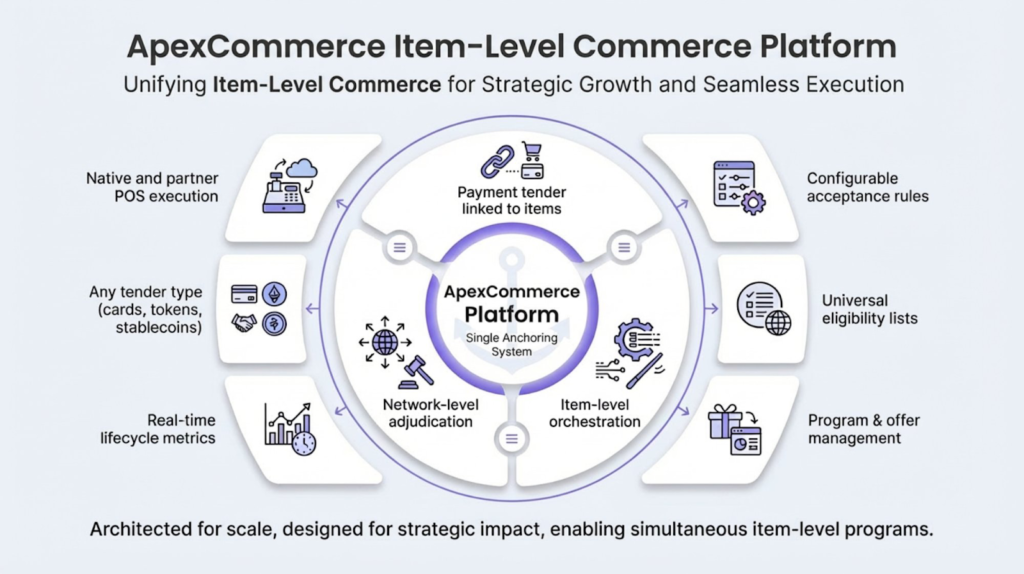
It works because it shows exactly what words struggle to explain:
- A dense idea
- Turned into a clear visual
- With readable text and structure
It’s a real example of what Nano Banana Pro makes possible.
If someone wants to see how these slides are actually created, this guide on how to use Nano Banana Pro for presentations walks through the process step by step.
Context-Aware AI That Understands Your Deck
Another frustration with older AI presentation tools was how forgetful they were.
You’d ask the AI to edit one slide, and it would act like it had never seen the rest of your deck. Concepts got reintroduced. Terminology changed. The story drifted.
That’s not how real people work.
When professionals edit a presentation, they’re always thinking about the whole thing. What’s already been said. What the audience already knows. What assumptions are in place.
In 2026, context-aware AI finally works the same way.
It understands:
- The acronyms you’ve already defined
- The tone you’re using
- The story you’re building
- How slides connect to each other
So when you ask it to update a later slide, it doesn’t start from scratch. It builds on what’s already there.
That makes a huge difference in day-to-day work.
You can say things like:
- “Make this slide clearer”
- “Strengthen this argument for the same audience”
- “Simplify this without changing the story”
And the AI responds in a way that actually fits the deck.
Iteration stops feeling like cleanup work and starts feeling like collaboration.
Why Padding and Margins Matter More Than You Think
If you’ve ever looked at a professionally designed slide and thought, “This just feels better,” it’s probably not the content.
It’s the spacing.
Designers spend a surprising amount of time thinking about:
- How close things are to each other
- How much space surrounds key ideas
- What should feel tight and what should breathe
Most AI presentation tools ignored this for years.
They worked with fixed layouts. When the content didn’t fit, the solution was simple: shrink the text. That technically works, but it hurts readability and makes slides feel cramped.
In 2026, better AI systems treat space as something they can actually control.
Instead of forcing content into rigid boxes, AI can:
- Adjust padding inside elements
- Change margins around sections
- Rebalance layouts without shrinking text
This is especially important for dense slides.
Rather than making everything smaller, AI can reorganize space so the slide still feels clear and intentional.
This one change gives AI much more freedom. Slides stop looking repetitive. Layouts feel more natural. And presentations start to resemble what a real designer would create.
It’s a subtle shift, but it’s one of the biggest reasons AI presentations are finally starting to feel “right.”
Brand Themes That Actually Work
Most presentation tools say they support branding.
In practice, that usually means you pick a few colors and maybe a font, and the tool applies them on top of whatever layout already exists. It looks branded on the surface, but it doesn’t feel consistent.
Real brand identity runs deeper than colors.
Professionally designed decks follow a system:
- Fonts behave consistently
- Spacing feels intentional
- Visual rhythm stays the same from slide to slide
- Layout choices match the brand’s personality
In 2026, brand themes finally start working the way professionals expect.
Instead of “applying” a brand after the slide is built, the brand system becomes part of how slides are created in the first place. That means:
- Text slides and visual slides follow the same design logic
- Infographics match the tone of the rest of the deck
- Dense slides still feel on-brand, not cramped or off-style
This matters more than people realize. When a deck feels visually consistent, it builds trust. When it doesn’t, audiences may not know why, but they feel the friction.
What This Means for Professionals
For people who create presentations regularly, this shift is a big deal.
Things that used to take hours now happen in minutes:
- Complex visuals that once required a designer
- Layout refinements after feedback
- Turning rough ideas into polished slides
More importantly, professionals spend less time fighting formatting and more time thinking about the actual message.
The baseline quality of presentations rises for everyone. That doesn’t remove differentiation—it moves it.
In 2026, standing out is no longer about who knows the most design tricks. It’s about:
- Having a clear point of view
- Structuring a strong narrative
- Communicating ideas effectively
Design stops being the bottleneck. Story becomes the differentiator.
How Alai Is Building for the Future of AI Presentations
This is where Alai’s approach becomes clear.
Instead of treating presentations as static documents, Alai treats them as living stories that evolve.
It supports:
- Mixed slides in the same deck, combining responsive slides with Nano Banana Pro visual slides
- A simple “beautify this slide” flow to turn a basic slide into a visual explanation
- Multiple layout options for responsive slides, plus visual variants when needed
- Control over padding and margins for both AI and users
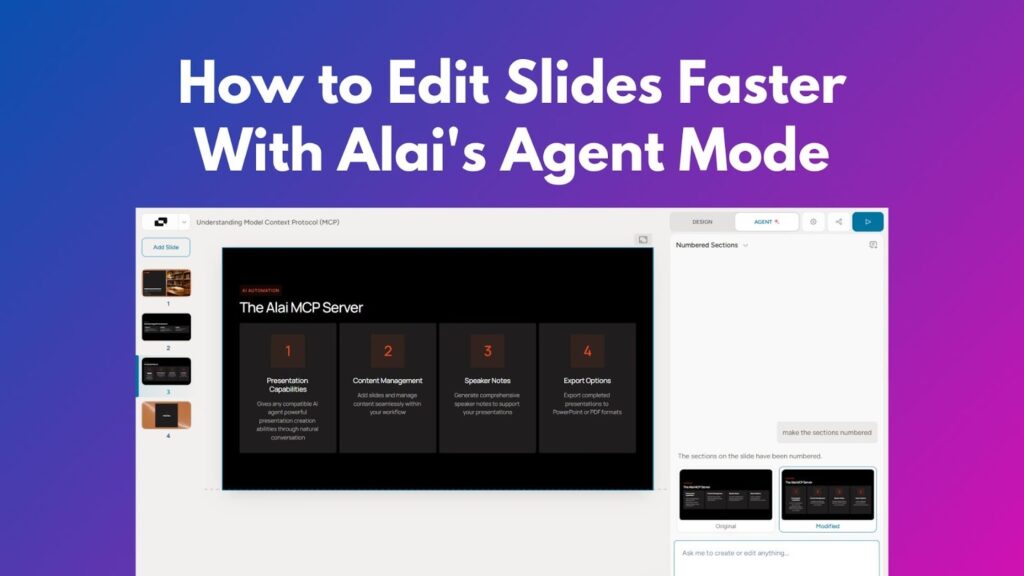
- Context-aware AI that understands the full deck, not just individual slides
- Brand themes that apply consistently across every slide type
All of these pieces work together. The result is not just faster slide creation, but better communication.
If you want to compare how different tools are approaching this shift, this overview of the best AI presentation makers highlights which platforms are actually building toward the future.
The Future of Presentations Is Already Here
AI presentations in 2026 are no longer about generating slides quickly.
They’re about helping people communicate clearly, visually, and confidently.
If you’re ready to move beyond basic slide generation and start building presentations that actually tell a story, you can try Alai here.
Final Thoughts
For a long time, presentations were limited by templates and manual design work.
AI changed how fast slides could be created. Now, it’s changing what presentations can be.
As we move into 2026, the most valuable AI tools won’t be the ones that generate the most slides. They’ll be the ones that help people explain ideas, influence decisions, and tell better stories.
That’s the real future of AI presentations.
FAQs
1. What makes AI presentations in 2026 different from earlier tools?
AI now understands intent, context, and storytelling, not just slide structure.
2. What are mixed slides and why do they matter?
Mixed slides allow different slide types in one deck, so each idea is presented in the most effective format.
3. How does Nano Banana Pro improve visual slides?
It allows AI to generate complex visuals with readable text, labels, and hierarchy.
4. Why is spacing so important for slide quality?
Control over padding and margins improves clarity, balance, and readability without shrinking text.
5. Do professionals still need designers for presentations?
Designers are still valuable, but AI now handles much of the repetitive layout work, letting professionals move faster with higher quality.
