
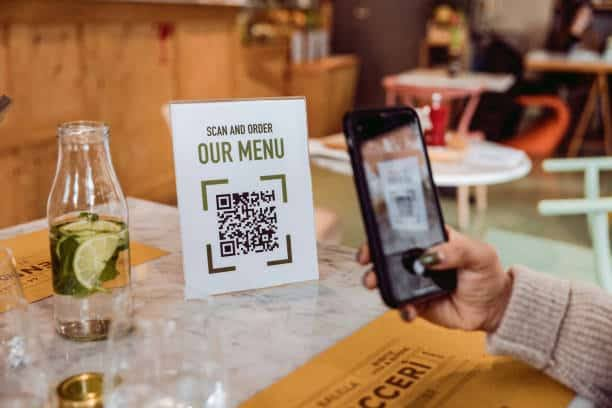
Restaurant guests increasingly expect quick access to menus without waiting for a server or handling a printed menu. A QR code menu lets customers scan a code with their smartphone, browse available food and drinks, and, depending on the system, place an order and complete payment directly from their device.
For restaurants, bars, and entertainment venues, QR ordering can do more than replace printed menus. When connected with POS systems and fulfillment workflows, digital ordering can help route requests directly to kitchen or beverage stations while reducing manual order entry.
What Is a QR Code Menu?
A QR code menu is a digital restaurant menu that guests access by scanning a Quick Response code with their smartphone camera.
The QR code normally directs the customer to a web-based menu. Modern smartphones can typically scan these codes through the standard camera app, so guests generally do not need to download a separate application.
Once the menu opens, customers may be able to:
- Browse food and drinks
- View prices and descriptions
- See item images
- Select modifiers
- Place an order
- Pay digitally
The available features depend on the QR ordering platform.
How Does a QR Code Menu Work?
A QR code acts as a shortcut to an online menu or ordering interface.
When a customer scans the code, the phone recognizes the embedded URL and prompts them to open the corresponding webpage. The actual menu is stored online rather than inside the QR code itself.
This means restaurants can update the digital menu without necessarily replacing every physical QR code.
More advanced systems can assign unique QR codes to individual tables or service areas. Smart Bar USA uses location-specific QR codes so submitted orders can be connected with the location where they originated.
Why Restaurants Use QR Code Menus
Restaurants initially adopted QR menus as a convenient alternative to printed menus, but the technology can now support much broader ordering workflows.
Faster Menu Access
Guests can open the menu as soon as they sit down rather than waiting for printed menus to arrive.
This can be especially useful during busy service periods when staff members are handling multiple tables.
Easier Menu Updates
Restaurants frequently change:
- Prices
- Seasonal items
- Daily specials
- Drink selections
- Availability
- Descriptions
A digital menu can be edited without reprinting an entire set of physical menus. Current QR menu guidance consistently identifies real-time menu updates as one of the main operational advantages.
Less Manual Order Entry
When QR ordering connects directly with restaurant systems, customers can submit orders without a server manually entering every item.
This can reduce an extra step between selection and fulfillment.
QR Code Menu vs. a PDF Menu
Not every digital menu provides the same customer experience.
One common approach is creating a QR code that opens a PDF version of the restaurant’s printed menu. While simple, this may require customers to zoom and move around a fixed document on a small phone screen.
Several current ranking guides recommend using a mobile-responsive web menu instead of simply linking to a print-formatted PDF.
A mobile-first QR menu should make categories, item names, prices, and ordering controls easy to read and use from a smartphone.
Can Customers Order From a QR Code Menu?
Yes, if the system includes mobile ordering.
A basic QR menu may only display food and beverage choices. More advanced solutions allow guests to select items, customize their order, submit it, and pay from their phone.
Smart Bar USA’s QR ordering technology supports both food and beverage requests. Food orders can be routed toward kitchen workflows, while cocktail requests can connect with supported Smartender automated dispensing systems.
This gives guests one ordering interface while allowing different items to move through the appropriate fulfillment process.
Can Customers Pay Through a QR Code Menu?
Some QR ordering systems allow customers to complete the transaction from their mobile device.
Smart Bar USA supports digital payment options including Apple Pay, Google Pay, and credit cards within its QR ordering workflow.
Combining browsing, ordering, and payment can reduce the number of separate interactions required to complete a restaurant transaction.
The exact payment workflow depends on the restaurant’s POS system and technology configuration.
How QR Code Menus Connect With POS Systems
POS integration is important when a restaurant wants QR ordering to become part of its regular operations rather than operate as a separate digital menu.
With an integrated system, a guest submits an order and that information can move through existing restaurant workflows.
Depending on the setup, this may include:
- Customer scans the table QR code.
- Customer selects food or drinks.
- Order is submitted from the phone.
- Transaction routes through the POS.
- Food requests move to kitchen fulfillment.
- Beverage requests move to the appropriate bar workflow.
- Staff deliver the completed order to the correct location.
Smart Bar USA specifically connects its digital ordering technology with POS workflows, kitchen stations, beverage systems, and location-based delivery.
What Makes a Good QR Code Menu?
A QR code is only useful if the menu experience behind it works well.
Restaurants should prioritize:
Mobile-Friendly Design
Menus should be easy to read without pinching and zooming.
Fast Loading
Heavy images and oversized files can slow the experience. Current QR menu design guidance consistently recommends fast-loading mobile pages.
Clear Categories
Guests should quickly find sections such as appetizers, entrées, cocktails, beer, desserts, or specials.
Accurate Availability
Sold-out products, pricing, and menu changes should be updated promptly.
Easy Ordering
If ordering is enabled, modifiers and checkout steps should be clear and straightforward.
Where Should Restaurants Place QR Codes?
QR codes should appear where customers naturally need menu access.
Common locations include:
- Restaurant tables
- Bar tops
- Table tents
- Counters
- Hotel rooms
- Pool areas
- Entertainment venues
- Receipts
- Takeaway packaging
Codes should be large enough to scan easily and should be tested from the distance guests will typically use them.
Location-specific QR codes can also help restaurants associate an incoming order with a particular table or service area.
Are QR Code Menus Useful During Busy Periods?
QR ordering can be particularly useful when restaurants are handling high order volumes.
Instead of requiring staff to manually take every initial order, guests can browse and submit requests independently.
Smart Bar USA combines QR ordering with POS integration and automated beverage fulfillment to help hospitality businesses coordinate orders during high-volume periods.
Staff can then spend more time on food delivery, hospitality, customer questions, and other service tasks.
QR Code Menus for Restaurants, Bars, and Hospitality Venues
QR ordering is not limited to traditional restaurants.
It can support:
- Bars
- Casinos
- Hotels
- Resorts
- Entertainment venues
- High-volume hospitality operations
The ideal configuration depends on how guests order, where items are prepared, how payments are processed, and how completed orders reach the customer.
Build a More Connected QR Ordering Experience
A QR menu can be much more than a digital replacement for a printed menu. When ordering, payment, POS integration, location tracking, and fulfillment work together, the same scan can become the starting point for a more connected restaurant service workflow.
Smart Bar USA helps hospitality operators combine mobile ordering with POS systems, kitchen workflows, and beverage automation. Explore Smart Bar USA’s QR code menu technology to see how digital ordering can fit into your restaurant, bar, or hospitality operation.
