
Business receipts are more than simple proof of purchase. They serve as valuable financial documents that help companies track expenses, monitor cash flow, and maintain accurate accounting records. Whether a business is large or small, managing receipts efficiently is essential for understanding spending habits and preparing for tax obligations. Unfortunately, paper receipts can easily become lost, damaged, or disorganized, making it difficult to access important financial information when needed. Converting receipts into Excel spreadsheets creates a centralized system that improves visibility and control over business expenses.
Excel spreadsheets provide a structured format that allows businesses to sort, filter, and analyze financial data quickly. Instead of searching through stacks of paper, employees can locate specific transactions within seconds. Organized spreadsheets also support better budgeting and financial planning because expense patterns become easier to identify. By transforming paper receipts into digital records, businesses reduce administrative burdens while increasing the accuracy of their bookkeeping processes. This approach creates a foundation for more informed financial decision-making and long-term operational efficiency.
Collecting and Preparing Receipts for Data Entry
Before receipts can be transferred , businesses must establish a process for collecting and organizing them with receipt to excel. Receipts often come from multiple sources, including office supplies, travel expenses, client meetings, equipment purchases, and utility payments. Gathering all receipts in one location helps prevent documents from being overlooked during the recording process. Companies may use folders, envelopes, or digital scanning applications to keep receipts categorized by date, department, or expense type.
Preparation is equally important because clear and readable receipts make data entry much faster. Receipts should be reviewed to ensure that critical details such as vendor name, transaction date, purchased items, and total amount are visible. Damaged or faded receipts should be scanned immediately to preserve the information. Creating a consistent workflow for receipt collection minimizes errors and ensures that every expense is accounted for. When businesses take time to organize receipts before entering them into Excel, they create a smoother and more reliable record-keeping process that supports accurate financial reporting.
Building an Effective Excel Spreadsheet Structure
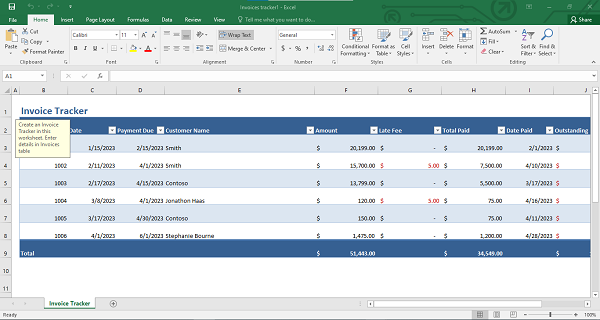
A well-designed spreadsheet is essential for transforming receipts into meaningful financial records. The first step is creating column headers that capture all necessary information. Common columns include receipt number, transaction date, vendor name, expense category, payment method, tax amount, total cost, and notes. These categories provide a clear framework that makes financial data easy to understand and analyze. Consistency in formatting is crucial because standardized entries help prevent confusion and improve reporting accuracy.
Businesses can enhance their spreadsheets by using Excel features such as data validation, drop-down menus, and conditional formatting. For example, expense categories can be selected from predefined lists to ensure uniform naming conventions. Conditional formatting can highlight unusual expenses or missing information, allowing users to identify issues quickly. Formulas can automatically calculate totals, monthly spending, and category-specific expenses, reducing manual calculations. A thoughtfully structured spreadsheet transforms raw receipt information into an organized database that supports budgeting, audits, and financial reviews. The more systematic the spreadsheet design, the greater its value as a business management tool.
Entering and Verifying Receipt Information Accurately
Data entry is one of the most important stages in converting receipts into Excel spreadsheets. Accuracy during this step ensures that financial records remain trustworthy and useful. Each receipt should be entered carefully, with attention given to dates, amounts, vendor names, and expense classifications. Establishing a standard format for dates and currency values helps maintain consistency throughout the spreadsheet. Employees responsible for data entry should follow clear guidelines to reduce variations and prevent mistakes.
Verification is equally critical because even small errors can affect financial reports and budgeting decisions. Businesses should compare spreadsheet entries against the original receipts to confirm accuracy. Double-checking totals and reviewing formulas can help identify discrepancies before they become larger problems. Some organizations implement a secondary review process where another team member verifies the data after entry. Modern receipt-scanning technologies and optical character recognition tools can further improve efficiency by extracting information automatically, although manual review remains important. By combining careful data entry with thorough verification procedures, businesses create dependable financial records that support compliance and informed decision-making.
Modern receipt automation tools can significantly reduce the time required to process business expenses. Using OCR and AI-powered document extraction, businesses can automatically capture merchant names, dates, line items, taxes, and totals from paper or digital receipts. This information can then be exported directly into Excel spreadsheets, eliminating much of the manual data-entry process while improving accuracy.
The true value of converting receipts into Excel spreadsheets becomes evident when businesses use the information to improve operations. Organized expense data provides insights into spending trends, helping managers identify areas where costs can be reduced or controlled. Monthly and quarterly analyses reveal patterns that may otherwise remain hidden in paper records. Businesses can compare expenses across departments, evaluate supplier costs, and monitor budget performance with greater confidence.
Excel spreadsheets also simplify tax preparation and financial reporting. When receipts are categorized and recorded accurately, generating expense summaries becomes much easier. Audits can be completed more efficiently because supporting documentation is readily available and searchable. Furthermore, organized spreadsheets support strategic planning by providing a clear picture of historical spending behavior. Decision-makers can use this information to forecast future expenses, allocate resources more effectively, and improve overall financial stability
Turning business receipts into organized Excel spreadsheets is not merely an administrative task; it is a practical strategy for gaining better financial control, enhancing productivity, and supporting sustainable business growth in an increasingly data-driven environment. Modern receipt to Excel solutions help businesses automate expense tracking, improve reporting accuracy, and reduce administrative workloads
